Lead Management & Sales Pipeline
Track every incoming opportunity from first contact through to signed job. Leads in Service Opus carry their own activities, tasks, documents, notes, and analytics — so your team always knows where a prospect stands and what the next step is.
What lead management covers
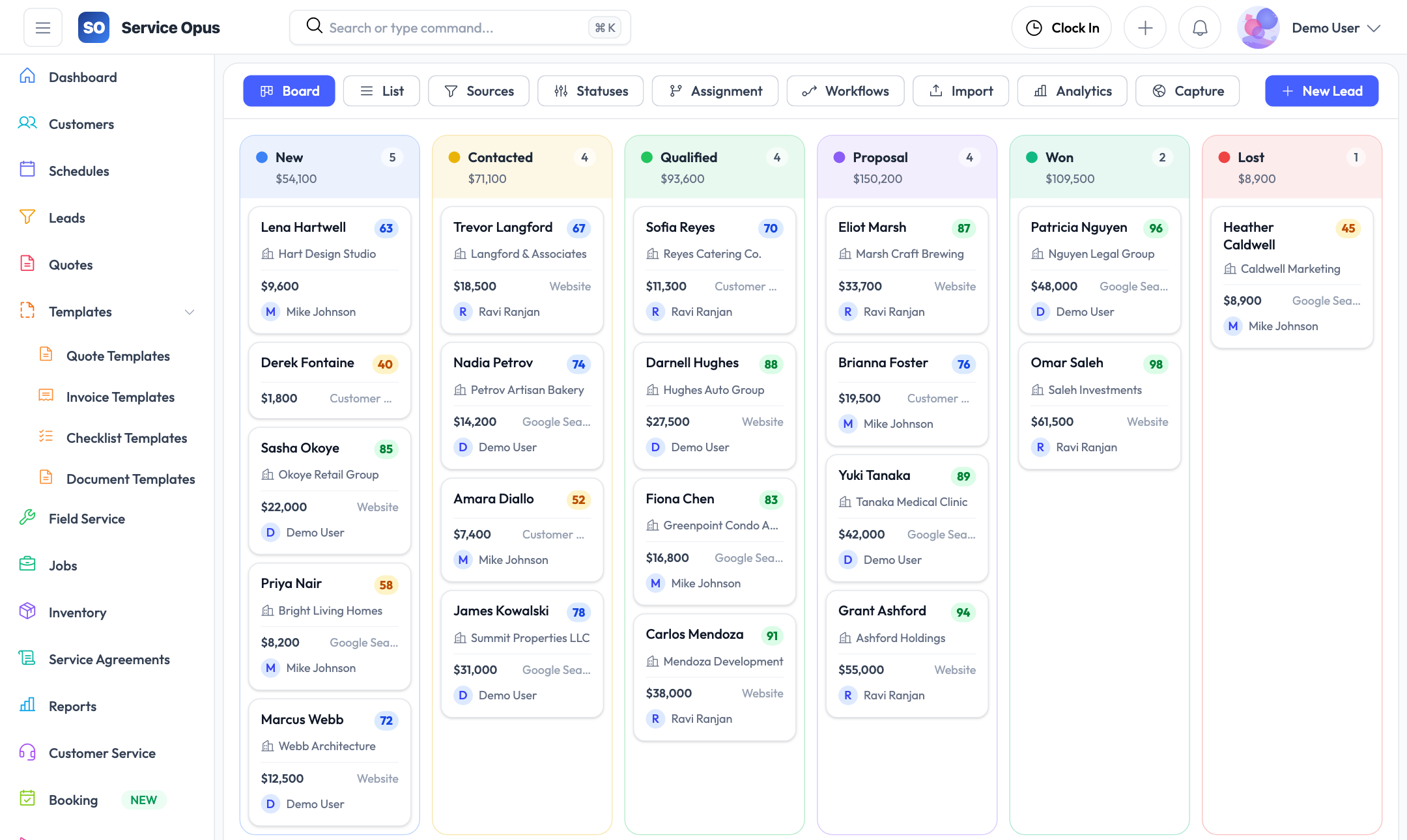
- Pipeline view with custom statuses and source tracking
- Activities, tasks, documents, notes, and timeline per lead
- Analytics across conversion rates and source performance
- Assignment rules and workflow automation
- Public lead capture form for your website
A complete view of every opportunity
Each lead record collects everything your team needs to move the opportunity forward without hunting through emails or spreadsheets.
Lead list and pipeline view
View all open leads in a sortable, filterable list. Filter by status, source, assigned employee, or date range. Pagination keeps large pipelines manageable without losing context.
- Filter by lead status, source, or assigned team member
- Sort by creation date, follow-up date, or estimated value
- Bulk actions for common pipeline operations
- Quick-access lead detail from the list row
Custom lead statuses
Define your own lead lifecycle stages — from initial inquiry through to won or lost. Each status has a name and a position in your pipeline so the list always reflects how your business actually works.
- Create and reorder custom status stages
- Move leads through the pipeline with a single update
- Filter list and analytics by any status combination
Lead sources
Track where each lead originated — referral, Google, website form, phone call, trade show, or any category your business uses. Source data feeds the analytics so you know which channels produce the most closed work.
- Configurable source list to match your marketing channels
- Source recorded on every lead for reporting accuracy
- Analytics break down acceptance rates and conversion by source
Lead record tabs
- Overview — contact info, status, source, assigned employee, estimated value
- Activities — log calls, emails, site visits, and meetings with timestamps
- Tasks — create follow-up to-dos with due dates assigned to team members
- Documents — attach files with tag labels for easy retrieval
- Notes — internal notes visible to your team
- Timeline — full activity history showing every change and interaction
Keep follow-up structured
Leads without follow-up structure fall through the cracks. Activities and tasks give your team a clear record of what has happened and what needs to happen next.
Activity logging
Log phone calls, emails, site visits, and meetings directly on the lead record with dates, notes, and outcomes.
Task management
Create follow-up tasks with due dates and assign them to specific team members. See all open tasks from the lead detail view.
Lead documents
Attach site photos, quotes from other suppliers, signed scope documents, and any other files. Tag documents for easy search from the document library.
Internal notes
Leave structured notes for your team on customer preferences, site conditions, price sensitivity, or anything else that matters for converting the lead.
Lead analytics
Review funnel metrics across your entire pipeline: conversion rate by source, average time to close, lead volume by period, and status distribution.
Convert to customer
When a lead becomes a job, convert it to a full customer record with one action. No re-entering contact details or site information.
Route and automate incoming leads
High-volume pipelines need structure. Lead assignment rules and workflow automation remove manual routing decisions from your team's plate.
Lead assignment rules
Configure rules that automatically assign incoming leads to the right team member based on source, service type, location, or other criteria. Leads that arrive through the public capture form or a booking request get routed without anyone manually reviewing the queue.
- Rule-based routing by source or other lead attributes
- Assign to specific employees or distribute across a team
- Rules apply immediately when a new lead is created
Lead workflow rules
Define automated actions that trigger when a lead changes status or meets other conditions. Use workflow rules to send internal notifications, update fields, or schedule follow-up reminders without manual intervention.
- Trigger actions on status changes or other lead events
- Internal notifications to keep the team informed
- Configurable rule priority and conditions
Public lead capture form
Embed a branded lead intake form on your website. When a prospect submits the form, a lead record is created in Service Opus automatically — complete with their contact details and enquiry — and assignment rules run immediately.
- Public-facing form with your company branding
- Automatically creates a lead on submission
- Assignment rules apply without any manual step
Analytics coverage
- Lead volume by period and status
- Conversion rate from lead to customer
- Average time from creation to conversion
- Lead breakdown by source
- Source effectiveness — which channels produce closed work
- Pipeline value by status
See it in action
Stop managing leads in spreadsheets
See how lead management connects to quoting, scheduling, and customer records inside the same platform.